

Modulated Current Add-On
Overview
The Modulated Current option is a software feature used to execute complex user-generated waveforms. Using Modulated Current allows users to move beyond simple DC or basic duty-cycle pulsing. It enables the creation of highly complex, customizable current waveforms defined by sequences of specific current steps.
Applications
- Semiconductor characterization
- Reliability and burn-in testing
- Thermal response analysis
- Dynamic drive condition simulation
- Device stress and lifetime studies
- Research and development testing
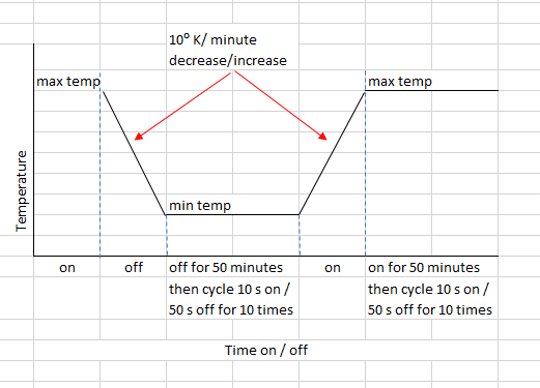
Temperature Cycling Test Control Sequence
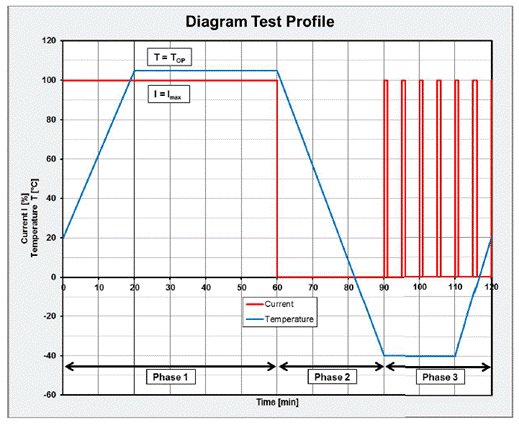
Modulated Current may be used to generate the waveform for IEC 62717 and AECQ102 test. The IEC 62717 temperature cycling test is a vital procedure that evaluates the endurance and reliability of LED modules for general lighting. The test is conducted under environmental conditions that simulate typical operating conditions; the thermal expansion and contraction stresses that an LED experiences during everyday operation.
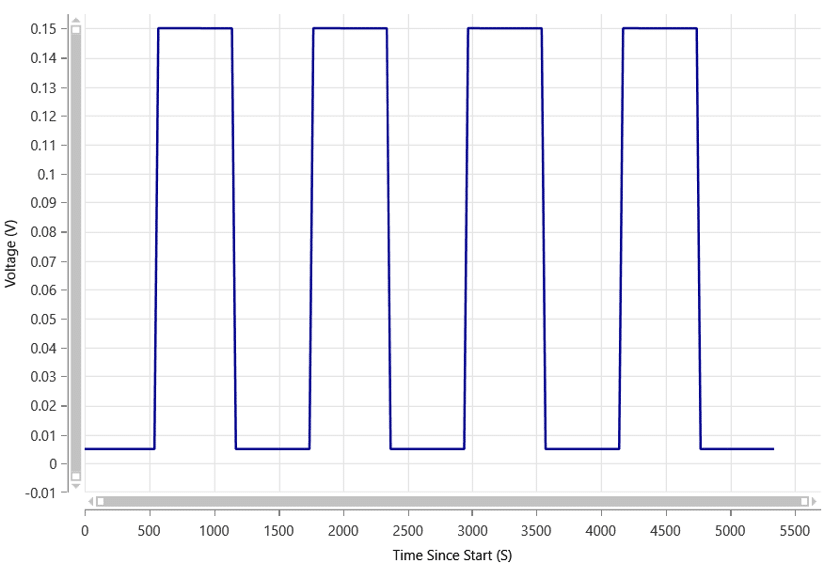
Red Eye Test Control Waveform Sequence
Eyes in photos will sometimes appear red. The appearance of red eyes in photos occurs when the camera flash (or some other bright light source) is reflected from the retina. To avoid the red eye syndrome, a “pre-flash” is built into some cameras. It fires the flash several times to close the subject’s pupil, so less light reaches the retina to be reflected. The red eye test was developed to validate LEDs use for the pre-flash function. Modulated current was used to create the exact sequence for execution
DC Pulse or On Off waveforms
While Vektrex sources provide On Off current capability with excellent pulse fidelity, it may be that creating a sequence for execution is simpler.
How to Create Waveforms Using Modulated Current
Waveforms are defined by a comma-separated string of commands called a sequence file. Individual steps may be combined and nested to generate the specific waveform. The sequence file defining a waveform are then downloaded into the source for execution. Vektrex software applications, STARS and Control Panel, enable use of modulated current files. Use SCPI commands for download and execution when developing your own application.
Basic Step Syntax
The syntax for a single step is [Time]@[Percentage].
Example: 1@100 = 1 second at 100% current.
Looped Sequences
You can repeat a series of steps a specific number of times (1 to 32,767) or indefinitely using the * operator.
Syntax: [Loop Count](Step1, Step2, …)
Example: 10(1@100,1@10) — This pulses 100% current for 1 second and 10% current for 1 second, repeating 10 times.
Complex Nested Sequences
You can mix static steps with looped sequences within a single file to create a multi-stage test profile.
Example: 10@25,5(1@50,2@100),25@10
Stage 1: 10 seconds at 25% current.
Stage 2: A loop of 50% (1s) and 100% (2s) current, repeated 5 times.
Stage 3: 25 seconds at 10% current.
Specifications
| Modulated Current Specifications | |
|---|---|
| Sequence Step Amplitude Range | 0-100% |
| Min Step Width | 1 ms |
| Max Step Width | 10 s |
| Step Width Accuracy | 10 μs |
| Max Number of Steps | 20 |
| Max Number of Steps (Loops) | 3 |
| Loop Count | 1 to 32767 or Infinite |
| Current Rise/Fall Time Each Step | 5 – 8 μs |
Modulated Current option also available in high current models.
Additional Information
Contact Us
For more information on the Modulated Current option and related products, visit our contact page.